---
title: Summer 2026 Release Product Update
description: See what’s new in Football Play Card with the ability to draw faster, teach clearer and share anywhere. We're live with drawing presets, animation enhancements, share links & more.
image: https://footballplaycard.com/hubfs/undefined.png
---
[Skip to content](https://footballplaycard.com/product-updates-release-notes/summer-2026#main-content)
[](https://footballplaycard.com/)
- [Testimonials](https://footballplaycard.com/testimonials)
- [Marketplace](https://footballplaycard.com/marketplace)
Show submenu for Marketplace
- [Browse Playbooks](https://footballplaycard.com/marketplace)
- [Become a Seller](https://footballplaycard.com/sell-your-playbook-football-play-card-marketplace)
- [Wristbands](https://footballplaycard.com/play-wristbands)
- Features
Show submenu for Features
- [Product Updates](https://footballplaycard.com/product-updates-release-notes)
- [Video Uploads](https://footballplaycard.com/features/video-uploads)
- [Game Planning](https://footballplaycard.com/features/game-planning)
- [Player Quizzes](https://footballplaycard.com/features/player-quizzes)
- [Help](https://knowledge.footballplaycard.com/)
Show submenu for Help
- [Blog](https://footballplaycard.com/blog)
- [Knowledge Base](https://knowledge.footballplaycard.com/)
- [Quicktips](https://footballplaycard.com/quicktips)
- [Pricing](https://footballplaycard.com/pricing)
- [Login](https://cta-service-cms2.hubspot.com/web-interactives/public/v1/track/redirect?encryptedPayload=AVxigLJ9nEyI0mPyTcMiBnRE9GS7qxavAG0dKik5w98eD0WHFeQfwdfagUzPKYGesT1xT%2F9lGxnbYE69kblo3kwdX%2BplvlO0ZD5lihSMdnVMr9iO0Nw%3D&webInteractiveContentId=118708685676&portalId=540433)
Open main navigation
Close main navigation
- [Testimonials](https://footballplaycard.com/testimonials)
- [Marketplace](https://footballplaycard.com/marketplace)
Show submenu for Marketplace
- [Browse Playbooks](https://footballplaycard.com/marketplace)
- [Become a Seller](https://footballplaycard.com/sell-your-playbook-football-play-card-marketplace)
- [Wristbands](https://footballplaycard.com/play-wristbands)
- Features
Show submenu for Features
- [Product Updates](https://footballplaycard.com/product-updates-release-notes)
- [Video Uploads](https://footballplaycard.com/features/video-uploads)
- [Game Planning](https://footballplaycard.com/features/game-planning)
- [Player Quizzes](https://footballplaycard.com/features/player-quizzes)
- [Help](https://knowledge.footballplaycard.com/)
Show submenu for Help
- [Blog](https://footballplaycard.com/blog)
- [Knowledge Base](https://knowledge.footballplaycard.com/)
- [Quicktips](https://footballplaycard.com/quicktips)
- [Pricing](https://footballplaycard.com/pricing)
- [Login](https://cta-service-cms2.hubspot.com/web-interactives/public/v1/track/redirect?encryptedPayload=AVxigLJ9nEyI0mPyTcMiBnRE9GS7qxavAG0dKik5w98eD0WHFeQfwdfagUzPKYGesT1xT%2F9lGxnbYE69kblo3kwdX%2BplvlO0ZD5lihSMdnVMr9iO0Nw%3D&webInteractiveContentId=118708685676&portalId=540433)
- [START TRIAL \>](https://cta-service-cms2.hubspot.com/web-interactives/public/v1/track/redirect?encryptedPayload=AVxigLLfSGxM9DpoV8DGRInG7YMYZ0dxTVXm8zNPXRjTYD9lPdhnQQpb%2Bl6n72uQLPUreq9Uh421BS%2B1B9Wm5J0Gwedb33cjom%2F7OBZdgcTqiWIPDm8%3D&webInteractiveContentId=118706497549&portalId=540433)
[START TRIAL \>](https://cta-service-cms2.hubspot.com/web-interactives/public/v1/track/redirect?encryptedPayload=AVxigLLfSGxM9DpoV8DGRInG7YMYZ0dxTVXm8zNPXRjTYD9lPdhnQQpb%2Bl6n72uQLPUreq9Uh421BS%2B1B9Wm5J0Gwedb33cjom%2F7OBZdgcTqiWIPDm8%3D&webInteractiveContentId=118706497549&portalId=540433)
Aug 1, 2026, 1:37:02 AM
# Summer 2026 Release Product Update
[Football Play Card](https://footballplaycard.com/product-updates-release-notes/author/football-play-card)
Share: [pinterest-p icon](http://pinterest.com/pin/create/link/?url=https://footballplaycard.com/product-updates-release-notes/summer-2026) [Share this page on Facebook](http://www.facebook.com/share.php?u=https://footballplaycard.com/product-updates-release-notes/summer-2026) [Share this page on Facebook](https://twitter.com/intent/tweet?url=https://footballplaycard.com/product-updates-release-notes/summer-2026) [Share this page on Facebook](http://www.linkedin.com/shareArticle?mini=true&url=https://footballplaycard.com/product-updates-release-notes/summer-2026) [Share this page on Facebook](mailto:?body=https://footballplaycard.com/product-updates-release-notes/summer-2026)
Summer 2026 Release Product Update
3:05
# BUILD YOUR GAME PLANNING CALL SHEET IN MINUTES
Coaches have been tagging their plays all season. This release puts those tags to work.
Game Planning is here. Tag your plays, build a game-day call sheet directly from your binder, and print it with the actual play diagrams on every card. No more rebuilding your call sheet from scratch each week, and no more flipping between your binder and a separate document.
Here is how it works, and everything new in Summer 2026.
---
## How Game Planning Works
Game Planning comes together in three steps:
1. Tag your plays by situation (Red Zone, 3rd and Long, Goal Line, two-minute). See How to Tag Your Plays - [https://knowledge.footballplaycard.com/tag-my-plays](https://knowledge.footballplaycard.com/tag-my-plays)
2. Build a call sheet from your binder. See How to Build and Print a Call Sheet - [https://knowledge.footballplaycard.com/build-and-print-call-sheet](https://knowledge.footballplaycard.com/build-and-print-call-sheet)
3. Let Tag Matching fill your sections automatically. See How to Auto-Fill Call Sheet Sections with Tag Matching - [https://knowledge.footballplaycard.com/autofill-with-tag-matching](https://knowledge.footballplaycard.com/autofill-with-tag-matching)
---
## Start with Tagging: The Foundation of Game Planning
Tagging is what makes Game Planning fast. When your plays are tagged by situation, your call sheet can build itself, and it stays current all season. If you do one thing before your next game, tag your plays.
A few minutes of tagging now saves you the weekly rebuild later. Every new play you tag going forward flows onto your call sheet automatically.
Get Started: How to Tag Plays - [https://knowledge.footballplaycard.com/tag-my-plays](https://knowledge.footballplaycard.com/tag-my-plays)
---
## Building Call Sheets
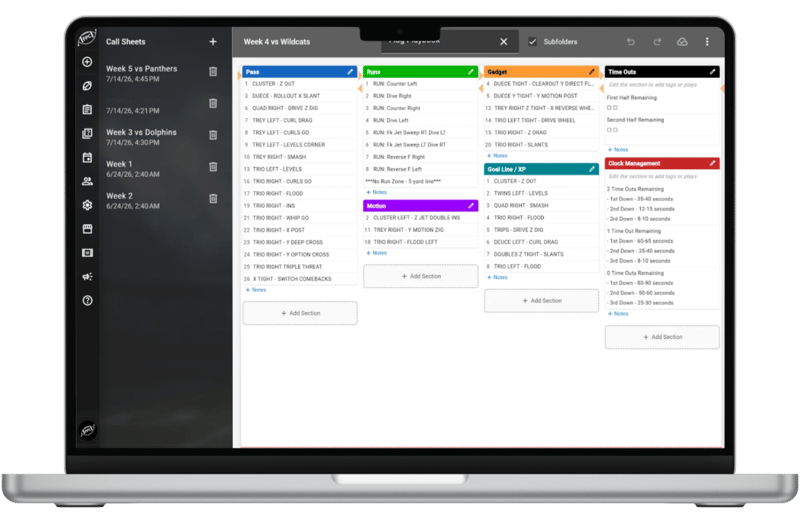
Your playbook now takes you all the way to game day.
Game Planning Call Sheets let you build and print a game-day call sheet from the plays already in your binder. Add plays to any section, arrange them the way you call the game, and print. There is no separate tool to learn and nothing to copy over by hand.
What You Can Do:
- Build a call sheet from any binder or folder
- Organize plays into custom sections for your situational groupings
- Sort plays within each section the way you want them to read
- Use "Select All" to pull plays from every subfolder at once
- Print a clean, game-ready sheet
Get Started: How to Build & Print a Call Sheet - [https://knowledge.footballplaycard.com/build-and-print-call-sheet](https://knowledge.footballplaycard.com/build-and-print-call-sheet)
---
## Tag Matching: Build Your Sections Once, Then Let Them Fill Themselves
This is where your tagging pays off. Choose which tags a section should match, and Tag Matching pulls in every play that matches, automatically. Add a new play and tag it, and it flows onto your call sheet without any extra steps. Set a section to match any of your tags, or require every tag for a more precise group.
What You Can Do:
- Add a section to your call sheet and choose which tags it matches
- Let every matching play populate the section automatically
- Keep your call sheet current just by tagging plays as you build them
Get Started: How to Auto-Fill Call Sheet Sections with Tag Matching - [https://knowledge.footballplaycard.com/autofill-with-tag-matching](https://knowledge.footballplaycard.com/autofill-with-tag-matching)
---
## Call Sheets with Play Diagrams
## 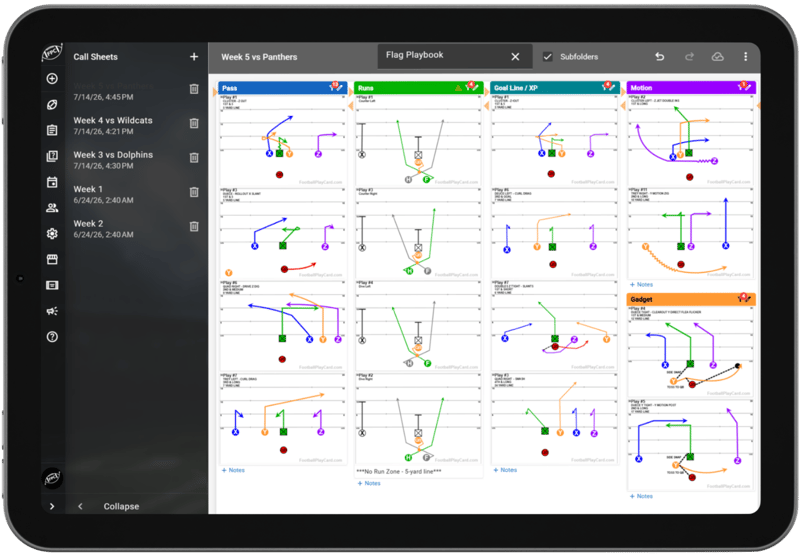
Your call sheet now shows the play, not just the name. Every card renders the actual drawn diagram, so you and your players can read the assignment at a glance, and the sheet is ready to coach from on the sideline.
---
## Try the New Features Today
Game Planning is live now for every account.
Log in to Football Play Card, start tagging your plays by situation and build your first Call Sheet today.
**👉 [Log in and try the Summer updates now.](https://app.footballplaycard.com/)**
---
If you have questions about any of these features or want help using them, visit our [Knowledge Base](https://knowledge.footballplaycard.com) or reach out to [support@footballplaycard.com](mailto:support@footballplaycard.com). We read every message.
More updates coming soon.
[Release Notes](https://footballplaycard.com/product-updates-release-notes/tag/release-notes), [Product Updates](https://footballplaycard.com/product-updates-release-notes/tag/product-updates)
## Related posts
[](https://footballplaycard.com/product-updates-release-notes/may-2026)
[Release Notes](https://footballplaycard.com/product-updates-release-notes/tag/release-notes), [Product Updates](https://footballplaycard.com/product-updates-release-notes/tag/product-updates)
## [May 2026 Release Product Update](https://footballplaycard.com/product-updates-release-notes/may-2026)
[Football Play Card](https://footballplaycard.com/product-updates-release-notes/author/football-play-card)
Jun 15, 2026, 10:46:46 AM
[Read more](https://footballplaycard.com/product-updates-release-notes/may-2026)
[](https://footballplaycard.com/product-updates-release-notes/march-2026)
[Release Notes](https://footballplaycard.com/product-updates-release-notes/tag/release-notes), [Product Updates](https://footballplaycard.com/product-updates-release-notes/tag/product-updates)
## [Spring 2026 Product Update](https://footballplaycard.com/product-updates-release-notes/march-2026)
[Football Play Card](https://footballplaycard.com/product-updates-release-notes/author/football-play-card)
May 3, 2026, 2:24:13 AM
[Read more](https://footballplaycard.com/product-updates-release-notes/march-2026)
[](https://footballplaycard.com/product-updates-release-notes/january-2026)
[Release Notes](https://footballplaycard.com/product-updates-release-notes/tag/release-notes), [Product Updates](https://footballplaycard.com/product-updates-release-notes/tag/product-updates)
## [January 2026 Product Update](https://footballplaycard.com/product-updates-release-notes/january-2026)
[Football Play Card](https://footballplaycard.com/product-updates-release-notes/author/football-play-card)
Jan 16, 2026, 5:38:15 PM
[Read more](https://footballplaycard.com/product-updates-release-notes/january-2026)
```json
{
"@context" : "https://schema.org",
"@type" : "BlogPosting",
"author" : {
"@type" : "Person",
"name" : "Football Play Card",
"url" : "https://footballplaycard.com/product-updates-release-notes/author/football-play-card"
},
"dateModified" : "2026-08-09T05:31:14.089Z",
"datePublished" : "2026-08-01T05:37:02.000Z",
"headline" : "Summer 2026 Release Product Update",
"image" : [ "https://footballplaycard.com/hubfs/undefined.png" ],
"mainEntityOfPage" : {
"@id" : "https://footballplaycard.com/product-updates-release-notes/summer-2026",
"@type" : "WebPage"
},
"publisher" : {
"@type" : "Organization",
"logo" : {
"@type" : "ImageObject",
"url" : "https://footballplaycard.com/hubfs/Logos/Football%20Play%20Card%20Logo%20with%20Name%20Black.svg"
},
"name" : "Football Play Card"
}
}
```
```json
{
"@context" : "https://schema.org",
"@type" : "VideoObject",
"contentUrl" : "https://540433.fs1.hubspotusercontent-na1.net/hubfs/540433/video_assets/218404562995/inherited/web_optimized.mp4",
"dateModified" : "2026-07-30T23:45:59.558Z",
"duration" : "PT18S",
"height" : 1080,
"name" : "Cleon - Adding Situational Tags",
"thumbnailUrl" : "https://540433.fs1.hubspotusercontent-na1.net/hubfs/540433/Cleon%20-%20Adding%20Situational%20Tags.mp4/medium.jpg",
"uploadDate" : "2026-07-30T23:45:54.775Z",
"width" : 1920
}
```
```json
{
"@context" : "https://schema.org",
"@type" : "VideoObject",
"contentUrl" : "https://540433.fs1.hubspotusercontent-na1.net/hubfs/540433/video_assets/218404548733/inherited/web_optimized.mp4",
"dateModified" : "2026-07-31T00:04:07.807Z",
"duration" : "PT12S",
"height" : 1080,
"name" : "Cleon Call Sheet",
"thumbnailUrl" : "https://540433.fs1.hubspotusercontent-na1.net/hubfs/540433/Cleon%20Call%20Sheet.mp4/medium.jpg",
"uploadDate" : "2026-07-31T00:04:05.230Z",
"width" : 1920
}
```
```json
{
"@context" : "https://schema.org",
"@type" : "VideoObject",
"contentUrl" : "https://540433.fs1.hubspotusercontent-na1.net/hubfs/540433/video_assets/218392421551/inherited/web_optimized.mp4",
"dateModified" : "2026-07-31T00:13:40.928Z",
"duration" : "PT31S",
"height" : 1080,
"name" : "Cleon - Tag Matching-1",
"thumbnailUrl" : "https://540433.fs1.hubspotusercontent-na1.net/hubfs/540433/Cleon%20-%20Tag%20Matching-1.mp4/medium.jpg",
"uploadDate" : "2026-07-31T00:13:23.833Z",
"width" : 1920
}
```