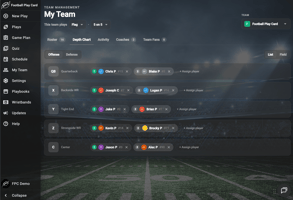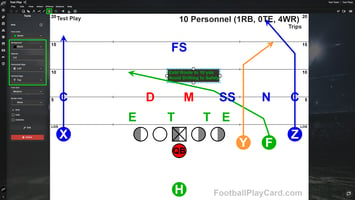
EVERY SNAP, LIVE FOR EVERYONE WHO CANNOT MAKE IT
Your plays have lived in Football Play Card for years. This fall, your season moves in with them, from the first practice on the schedule to the final score on game day.
The headline is Game Day. Keep score from the sideline, stream the game from a phone, and watch every streamed game again after the final whistle. Around it, your team gets a schedule, a team chat that replaces the group text, the right way to bring in the parents of younger players, and written assignments every player can carry on their wrist.
Here is what is new.
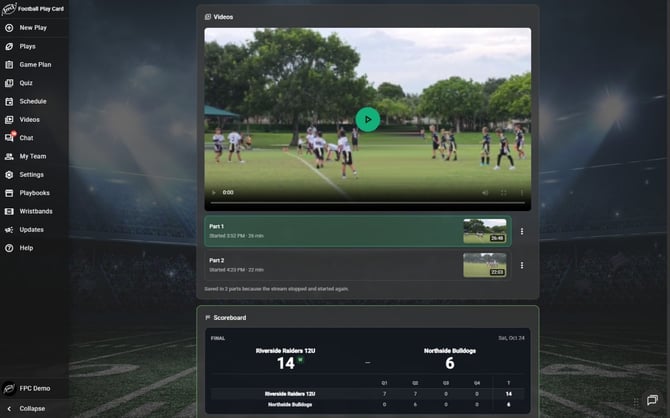
After the final whistle, the streamed game is saved right above the final score, ready to watch again.
Game Day: Keep Score, Stream and Save Every Game
Every game on your team schedule now has a Game Day tab. It is where the game happens live for everyone who is not standing on your sideline. Start with What is Game Day, and who can see it?
- Keep score live. Your scorekeeper turns a phone or tablet into the sideline scoreboard. Every score, quarter and timeout reaches your team as it happens, and the final score is saved on the game. See How do I keep score live on Game Day?
- Stream the game from a phone. Anyone on the team except Fans can go live from the Football Play Card mobile app, so the grandparent who cannot make it still sees every snap. The video stays private to your team. See How do I stream a game from my phone?
- Follow along from anywhere. The score moves on its own, with the live video beside it whenever someone is streaming. See How do I follow a game live?
- Share the score with anyone. A public link lets anyone follow the live score in a browser, with no account and no app. See How do I share the live score with people who don't have an account?
- Watch it again with Game Videos. Every streamed game is saved. It shows up on the game a few minutes after the stream ends, and the Videos page lists every game your team has saved. See How do I watch a recorded game?
- Play by your league's rules. Football Play Card comes with four common sets of game rules, and you can save your league's own, so the scoreboard counts periods, timeouts and downs the way you play. See How do I set up game rules for my league?
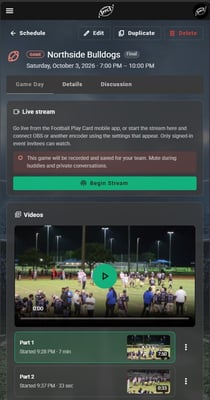
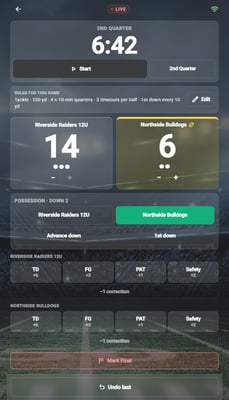
Flag or tackle, day or night. A night game saved on the Game Day tab, and the scorekeeper's phone keeping score.
Your Schedule and Team Chat, in One Place
Practice times in one app, RSVPs in a spreadsheet, and team news in a group text nobody can keep up with. This release puts all of it next to your playbook.
Team Schedule
Put your practices, games, tournaments and meetings on one schedule. Your team sees it in the app, in their email, and on the calendar they already use. See What is the team schedule, and which plans include it? and How do I create an event?
- Repeating events. Enter your Tuesday practice once instead of twelve times, and move a single rained-out date without rebuilding the season. See How do I set up a repeating event? and How do I change one date of a repeating event?
- RSVPs. Your team answers Yes, No or Maybe, you see the whole roster's answers on the event, and anyone who has not answered gets a reminder by email. See How do I collect RSVPs?
- Saved locations. Save the fields and gyms you use again and again. Each one gives your team a map link and puts the weather forecast on the event. See How do I save a location my team uses often?
- Your own calendar. Subscribe once, and the team schedule sits beside the rest of your week. See How do I add the team schedule to my own calendar?
- Cancel and tell everyone at once. Cancelling an event can email the team, post in team chat and send a notification to their phones in one step. See How do I cancel or delete an event?
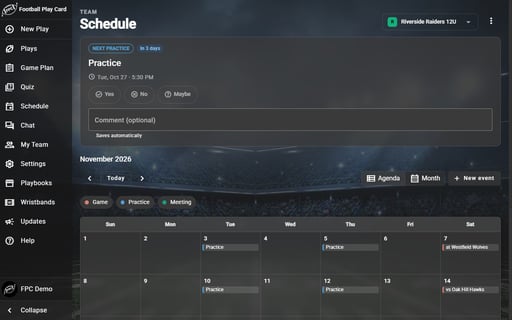
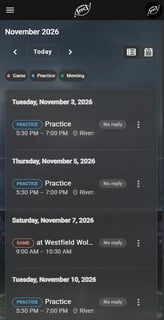
Plan the season in Month view, while players and parents see what's next on their phones.
Team Chat
Team chat is your team's conversation for the whole season, plus a private Coaches channel for your staff. See What is team chat, and who can see it?
- Announcements. Pin the message that cannot be missed. It sits above the conversation, goes to your team's phones as a notification, and shows how many people have read it. See How do I post an announcement?
- Mentions. Type @ and a name to get one person's attention, or link an event into a message so everyone can open it. See How do I post in my team's chat?
- A chat for every event. Every game and practice on your schedule has its own thread, where coaches post the field change or the new start time to just the people invited. Once the event starts, anyone invited can add photos and videos from it. See How do I find an event's chat? and How do I use the event chat?
- You choose who is in it. Decide whether parents and family are part of the team chat, and change it any time in the season. See How do I choose who can see the team chat?

Team chat on a tablet: the Team and Coaches channels, a thread for every event, and announcements that show how many have seen them.
Push Notifications
Announcements, mentions, new quizzes and live games now reach your team's phones. Everyone needs the latest Football Play Card mobile app, signed in, with notifications allowed. See How do I turn on push notifications on my phone? and How do I turn chat notifications on or off?
Bring Parents In, the Right Way for Every Age
- Followers. Parents, family and fans follow your team without playing for it, and they never pay. Each one gets a follower type, Parent/Guardian, Family & Friend or Fan, and the type decides what they see. See What can followers see? and How do I invite a follower?
- Team age. Every team now has a team age: Under 13, 13-18 or 18+. It decides how Football Play Card handles player accounts on your team. See What is team age, and how do I set it?
- Players under 13. A player under 13 goes on your roster without an account of their own, and you invite their parent or guardian to follow the team for them. The player keeps their spot on your roster and depth chart. See How do I add a player who is under 13? and How do I switch my team to Under 13?
- Parents answer for their child. A Parent/Guardian answers RSVPs and takes player quizzes for their child, so you get the same answers from a youth team as from any other. See How do I RSVP for my child? and How do I take a quiz for my child?
- One login for every team. Coach one team and follow your child's? Pick the team from the team picker, and the schedule, chat and roster all follow. See How do I switch between teams?
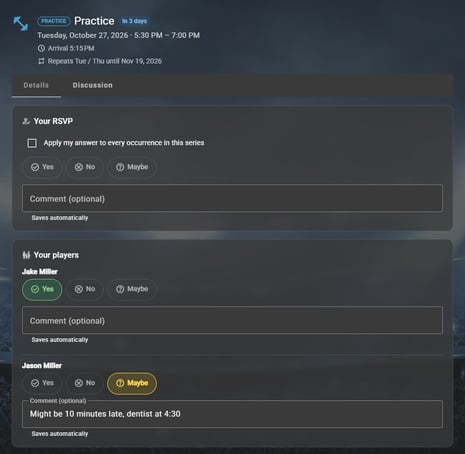
A parent answers the RSVP for each of their players, with a note for the coach.
Player Assignments, on the Play and on the Wrist
A drawn route tells a receiver what to do. It tells a left guard very little. Player Assignments let you write each player's job on a play in words, and they are now on for every coach.
- Write assignments. Open Assignments in the play editor and give each player a short line of text for the play. See How do I write player assignments?
- Review them side by side. See every player's assignment across a set of plays in one grid, and find the gaps before your linemen do. See How do I review assignments across my plays?
- Print assignment wristbands. Each player carries their own job for every play instead of reading it off a diagram. See How do I print assignment wristbands?
- Flip without losing your line. Flip Options let you decide, player by player, who crosses over when a play flips and who holds their side. You can also flip just the players you select. See How do I control which players flip?
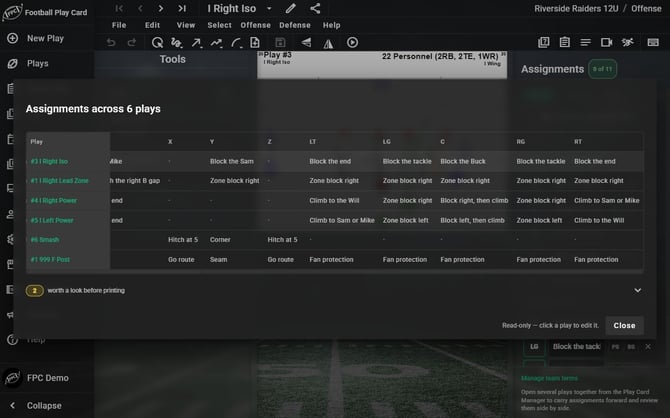
Review assignments across six plays at once, so a missing or mismatched block stands out before you print.
More Ways to Print Wristbands
- Play List Wristband. Print play names instead of diagrams and fit far more plays on one wrist coach insert, now with shaded alternate rows so the right line is easy to find. See How do I Print Play Wristbands (Wrist Coach Inserts)?
- Wristbands from a call sheet. Send a Game Planning call sheet straight to the wristband printer, in the order you built it. See How do I print wristbands from a call sheet?
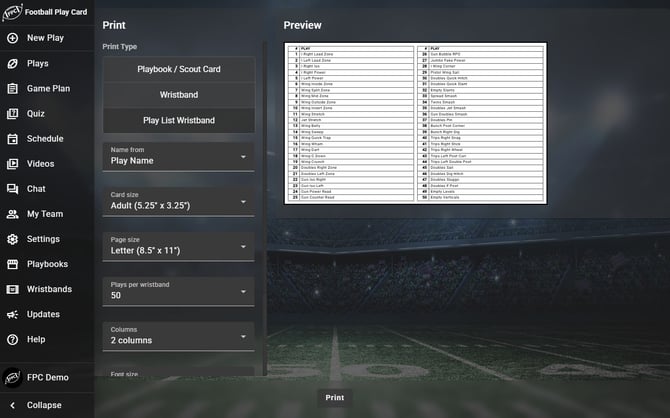
Fifty plays on one wrist coach insert with the Play List Wristband.
More in the Play Editor
- Blitz stencils. Built-in stencils for common blitzes, from a Mike A-gap to a Nickel edge, that follow your strength when the play flips.
- Formation folders. File your custom formations into folders, one per formation family, and pick them by folder when you build a play.
- Your own note style. Save a note style as your default, and every new note starts in it on any device. Notes now keep their styles when you edit them, and you can copy and paste them.
- Shade with a stroke. With the Free Form Line tool, a short stroke beside an offensive player, with an Apple Pencil or a finger, sets that player's shading.
- Save several player defaults at once. Select several players, set their color, and save that look as each position's default in one click.
Your Account
- Pause your subscription. If you pay by card on our website, you can pause billing for the off-season and keep your plays and playbooks exactly as you left them. See How do I pause and resume my subscription?
- Get back a deleted team. Email support within 90 days and we can restore it. See Can I get back a team I deleted?
Changes You Will Notice
A few things work differently than they did before:
- Team Fans are now Followers. The tab in My Team is called Followers, and each follower has a type that decides what they see.
- Every team needs a team age. Teams made before this update show Not set. Set it from the Roster tab, or Football Play Card asks for it the next time you invite a player.
- Players are asked their birth month and year when they accept an invite, because players under 13 cannot have their own account. Football Play Card does not keep it. See Why am I asked for my birth month and year?
- An invite only works with the email it was sent to. A forwarded invite can no longer put the wrong person on your team. See Why can't I accept my invite with a different email address?
- New quizzes send a notification. A player, or the parent who takes quizzes for them, now gets a push notification when you assign a quiz.
Try the New Features Today
Game Day, Game Videos, the team schedule, team chat and followers are included with State Champion plans and above, the same as Player Quizzes. Player Assignments, team age, and adding a parent for a player under 13 work on every plan. The people you invite never pay.
Update the Football Play Card mobile app, open your next game on the schedule, and select Launch Scoreboard.
👉 Log in and try Game Day now.
If you have questions about any of these features or want help using them, visit our Knowledge Base or reach out to support@footballplaycard.com. We read every message.
More updates coming soon.